
Palworld Server Hosting,
All 32 Players on Every Plan
No slot pricing, no player caps — every plan runs Palworld’s full 32-player server. Updated to 1.0 from day one and live in under 60 seconds.






Pricing
One Cap: 32 Players. On Every Plan.
Palworld server hosting starts at $12.99/month. Plans differ in memory, storage and backups — never in seats. Pick by world size, not by how many friends you have.
Every plan: Palworld 1.0 from day one · auto-updates on restart · DDoS protection · daily leak-protection restarts · instant setup after payment
PayPal & Card accepted · 72-hour money-back guarantee · Cancel anytime
Leak protection
Palworld servers get slow.
Ours don’t.
Palworld’s memory leak survived 1.0. The longer a server runs, the more RAM it holds — until your group feels the stutters. The fix is boring and reliable: a clean daily restart. So we automated it.
01The leak is real
Palworld dedicated servers slowly eat memory, even in 1.0 and even on big hardware. Left running for days, that becomes rubber-banding and lag spikes.
02We restart in quiet hours
Every server gets one automatic restart a day, scheduled in its region’s quietest window — while your world sleeps, not mid-raid.
03Clean save first, then restart
The world saves to disk before the restart fires. Seconds later you’re back at baseline RAM — no lost progress, no drift.
 pal-eu-01RAM · last 7 days
RAM reclaimed
8.1GB
Downtime
41s
Players interrupted
0
Why Connect Hosting
Built for Palworld, Not Just Compatible
All 32 players. No slot pricing.
Every plan runs Palworld’s full 32-player server cap — Starter included. Upgrade for a bigger world, never to unlock more seats.
One server, every platform.
Crossplay is enabled on every server we deploy — Steam, Xbox, PS5 and Mac friends share one world. Console players join through Palworld’s in-game community browser; no IP typing needed. Restrict platforms anytime from the panel.
1.0 from day one
Running 1.0 since the day Pocketpair shipped it. Every patch installs on your next restart — no reinstall, no ticket.
Leak-protection restarts
A clean save and restart in your region’s quiet hours keeps long-running worlds at baseline RAM. See a real nightly log ↓
Off-server backups
Automated snapshots stored away from the host machine. Restore any one from the panel in a click.
DDoS protection
Always-on mitigation filters attacks before they reach your world — every plan, every region, at no extra cost.
Deploy where you play
Virginia to Dallas to Sydney on AMD Ryzen 9 7950X hardware — DDR5 RAM, NVMe storage, 10Gbps networking. Explore the network ↓
Instant setup
Order, pay, join. Your server deploys automatically and the address lands in your inbox.
The control panel
Your Whole Server,
One Dashboard
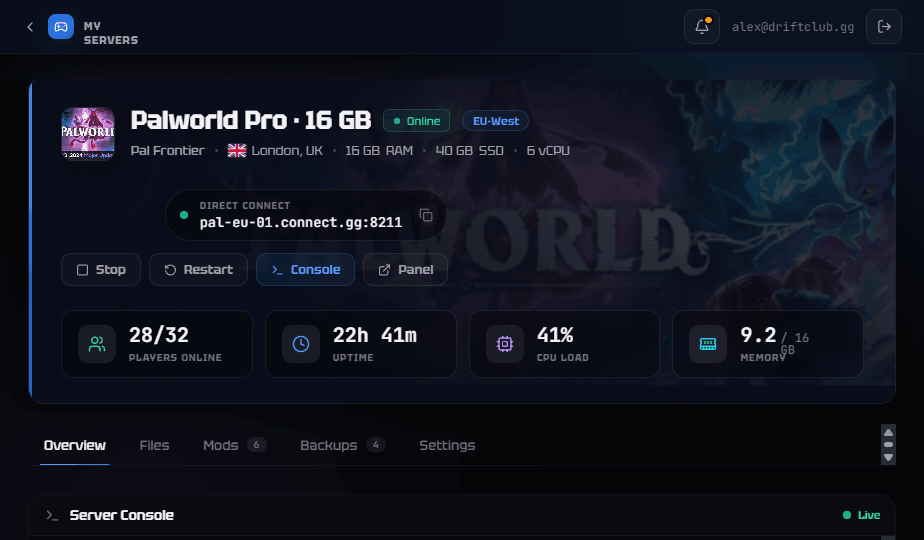
Console, power, world settings — everything lives in one clean web panel. No SSH, no config-file spelunking.
Live console
Logs, player joins and commands in real time, straight from the browser.
One-click power
Start, stop or restart the server — and watch it come back — in one click.
World settings
Rates, difficulty, PvP and your server password as simple form fields — no config files.

Global network
Seven Regions, Pick the Closest
The same DDoS-protected stack with dedicated RAM and NVMe in every region.

 NO.110 FROSTALLION
 SUZAKU
 QUIVERN
 CHILLET
The full Paldeck on your server — including the 20+ new Pals added in 1.0.
Palworld 1.0
Out of Early Access — and Bigger
Palworld left early access on July 10, 2026. Version 1.0 caps three years of updates with a proper endgame, a map roughly twice the size — and nothing wiped: existing worlds carry straight over.
New in 1.0
Why a dedicated server
Questions
Palworld Hosting, Answered
Want the technical detail? Browse our Palworld server guides — RAM sizing, config, crossplay, save migration and the memory leak.
Playing from Australia or New Zealand? Palworld server hosting in Australia runs from Sydney — 12ms from Melbourne, and restarts on AEST rather than someone else’s timezone.