Palworld Server Mods: What Actually Works on a Dedicated Server
Most Palworld mods are client-only and do nothing server-side. Here’s the honest 1.0 picture: client-side vs server-side mods, why every server-side mod path is Windows-only, the "mods are not allowed on this server" fix, crossplay, and why mods break on updates.
July 12, 202610 min read
Share:
Share
On This Page
Here's the honest version most mod guides won't give you: the majority of Palworld mods are client-only and do nothing on a dedicated server — and every path that does change the server is Windows-only. Palworld 1.0 actually added an official mod system and Steam Workshop support, but the official docs are explicit that server-side mods run only on the Windows dedicated-server edition. Since almost every performance host (us included) runs the Linux server binary, those server-side mods don't apply. This guide sets expectations correctly — client vs server, what 1.0 changed, the errors people hit — then tells you what you can genuinely control on a managed Linux server.
Does Palworld have official mod support in 1.0?
Yes — more than it used to, with an important catch. Palworld 1.0 added:
An official mod system configured through a Mods/PalModSettings.ini file (keys bGlobalEnableMod and ActiveModList), generated after the server's first launch.
Steam Workshop support for browsing and subscribing to mods — flagged as highly experimental and Windows-only.
Outside those, mods are still distributed on Nexus Mods and CurseForge. Pocketpair's stance is "mods are welcome, use at your own risk" — they warn openly that mods can corrupt saves (even after removal) and that you should fully delete mods, not just disable them, before a big update. See the official mod docs.
The catch, spelled out in those same docs: "server-side mods work only on the dedicated server with Windows edition." We'll come back to why that matters for Linux hosts below.
This is the single distinction that saves you hours — and it's the question most guides skip.
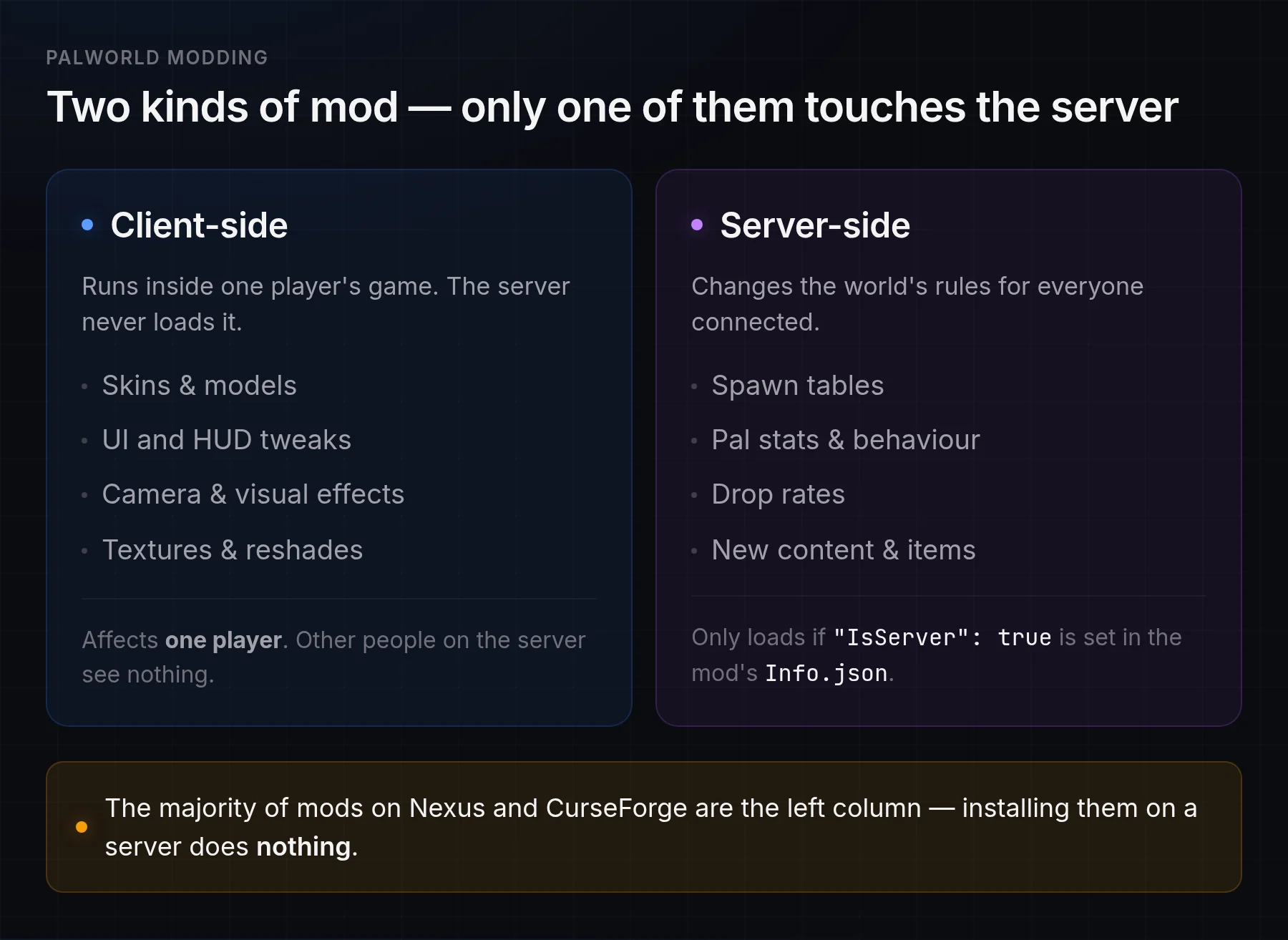
Client-side mods run in one player's game. Only mods flagged IsServer change the world for everyone — and most mods aren't.
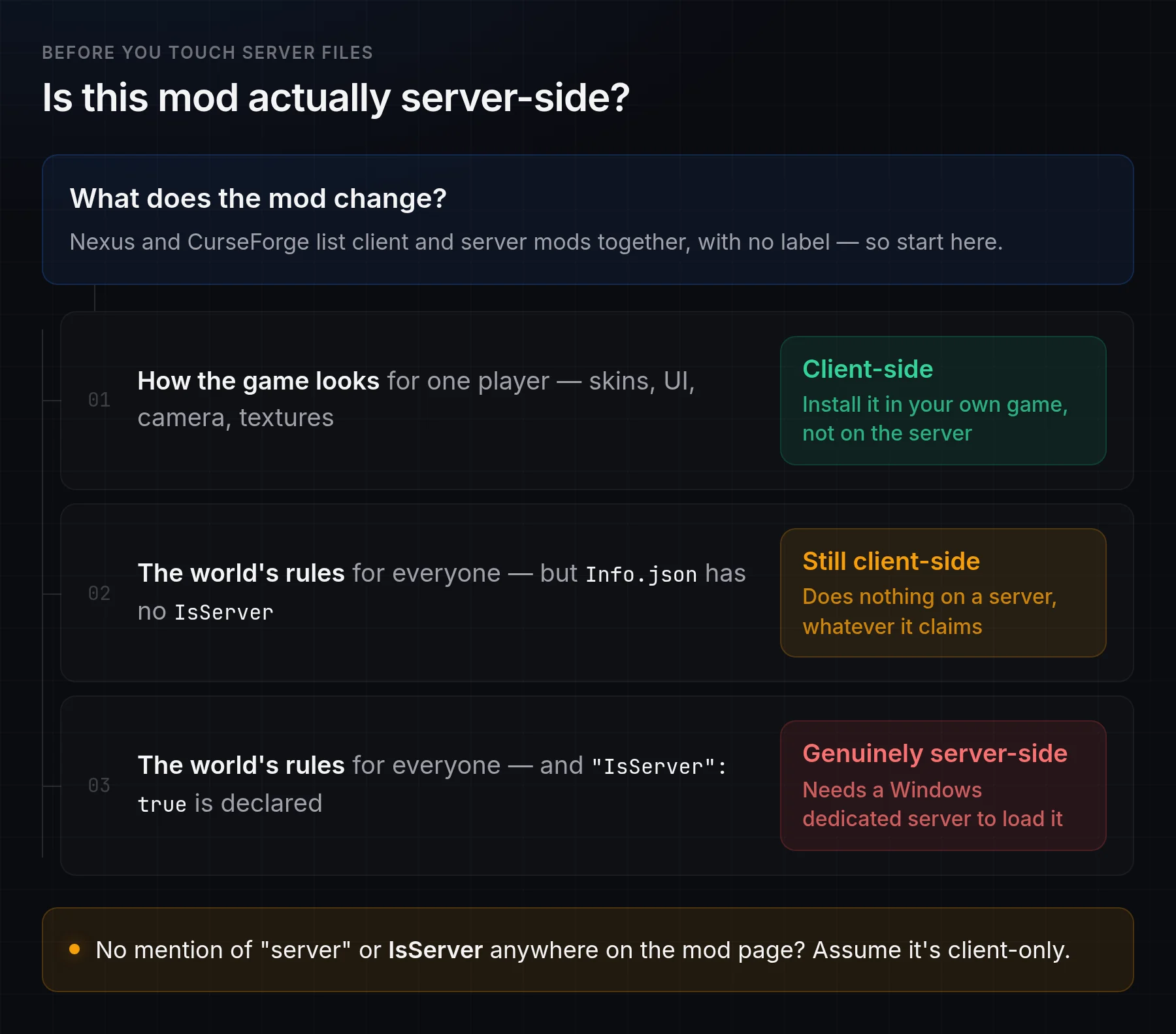
A mod's own metadata (Info.json) declares its InstallRule. If that rule doesn't include "IsServer": true, the mod does nothing server-side — it's a client mod, full stop. Quick decision checklist:
Does it change how the game looks for one player? (skins, UI, camera, textures) → client-side. Install it in your own game, not on the server.
Does it change the world's rules for everyone? (spawn tables, Pal stats, drop rates, new content) → server-side — and it only works if the server can load it.
Not sure? Check the mod's page for a "server" or IsServer note. No mention usually means client-only.
Mod type
Runs on a dedicated server?
Cosmetic / UI / visual / camera
No — client-only
New models or skins the client renders
No — client-only
Data changes (spawns, stats, drop rates)
Server-side only if the mod is flagged IsServerand the server can load mods
Gameplay mods with a client component
Only if installed on the server and every client, with identical files
The trap: Nexus and CurseForge list client and server mods together with no obvious label. A player drops a cosmetic mod on the server, nothing happens, and blames the host. Always confirm a mod is server-compatible before you touch server files.
Two questions settle it: what does the mod change, and does its Info.json declare IsServer?
How the official server-mod system is meant to work
If you are on a Windows dedicated server, here's the official flow (worth understanding even on Linux, because it explains the errors below):
Launch the server once so it generates Mods/PalModSettings.ini.
Set bGlobalEnableMod=true — the master switch for server-side mods.
Add each mod's package name to ActiveModList (one entry per mod). The mod's Info.json must declare "IsServer": true.
Make sure the -NoMods launch argument is not set — it force-disables everything.
Restart the server; mods apply on boot.
A minimal Mods/PalModSettings.ini ends up looking like this:
That's the whole official system — no Workshop-style one-click for servers, and (critically) it's gated to the Windows server build.
Why server-side mods don't run on a Linux Palworld host
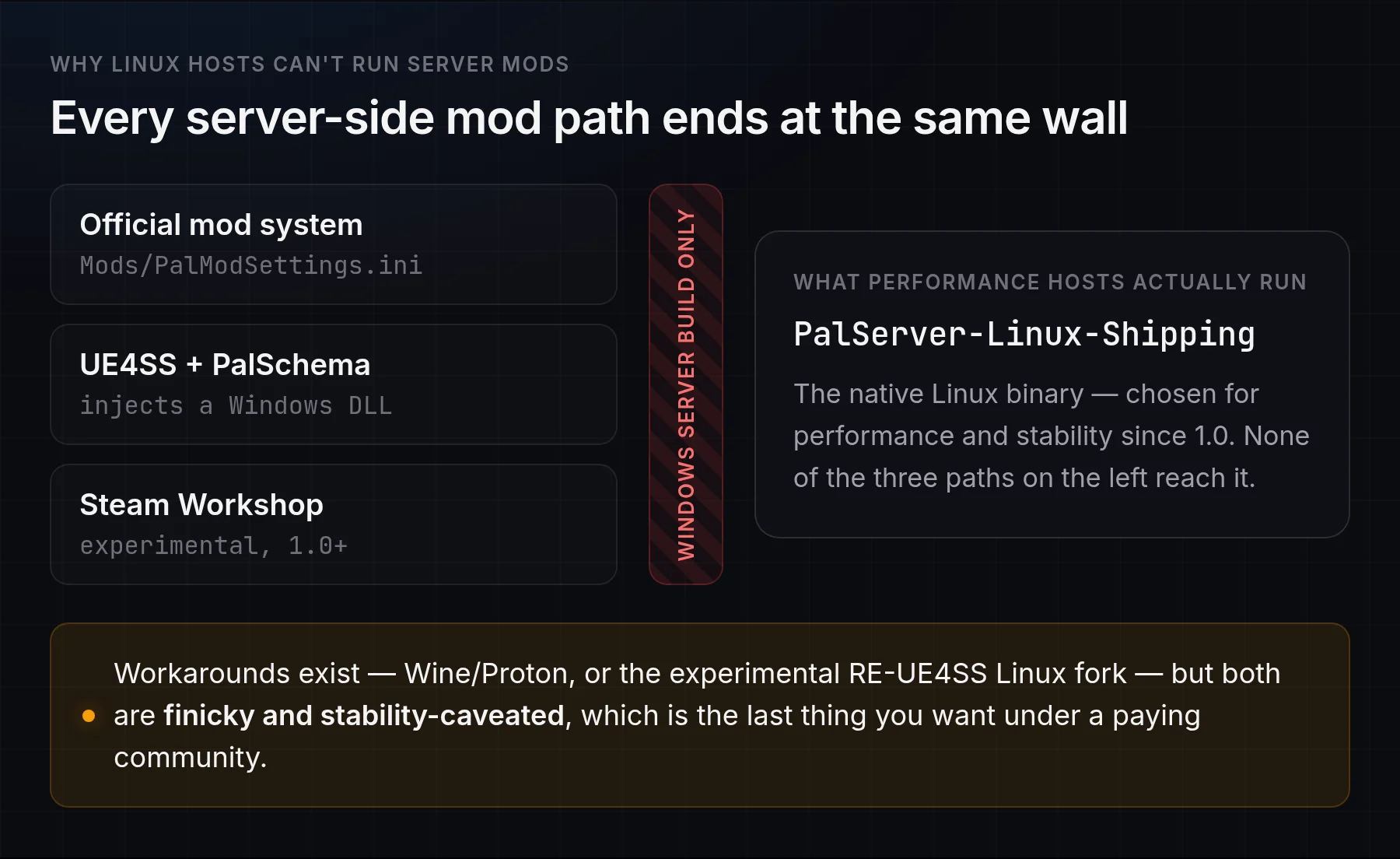
Every server-side modding path lands on the same wall — Windows-only:
Three different routes to server-side mods, one shared blocker: they all need the Windows server build.
The official mod system (PalModSettings.ini): the docs state plainly it works "only on the dedicated server with Windows edition."
UE4SS (the community loader most gameplay mods and PalSchema depend on): injects a Windows DLL and is not officially supported on Linux — you'd have to run the Windows server under Wine/Proton.
Steam Workshop: Windows-only and experimental.
Since 1.0, most hosts (including us) run the native PalServer-Linux-Shipping binary for performance and stability. The workarounds — Wine/Proton, or the experimental RE-UE4SS Linux fork — are finicky and stability-caveated, which is exactly what you don't want under a paying community. Plain .pak files the game loads itself are the most OS-portable option, but they're also the ones that break hardest on updates.
The honest takeaway: on a managed Linux Palworld host, deep server-side modding is limited today. Anyone promising rich, one-click server mods on Linux is overselling it. What you can reliably do — and what most people actually want "mods" for — is tune the game through server settings: rates, difficulty, spawns, PvP, base limits. Our config guide covers those knobs in full.
"Palworld mods are not allowed on this server" — what it means
This message shows up client-side when you try to join a server whose mod state doesn't match yours — almost always because the server has modding disabled (or its enabled-mod list doesn't include the mods you're running). On a Linux host, server-side mods are off by default, so a client-side mod that expects a server counterpart can trip it.
How to fix it:
Remove the client mod you're joining with, then reconnect — this clears it in the vast majority of cases.
If you specifically want that mod, it has to be enabled on the server too (which means a Windows server that can load it) and matched on every client.
Double-check you and the server are on the same game version — a version gap produces connection errors that look similar.
Do Palworld mods work in crossplay?
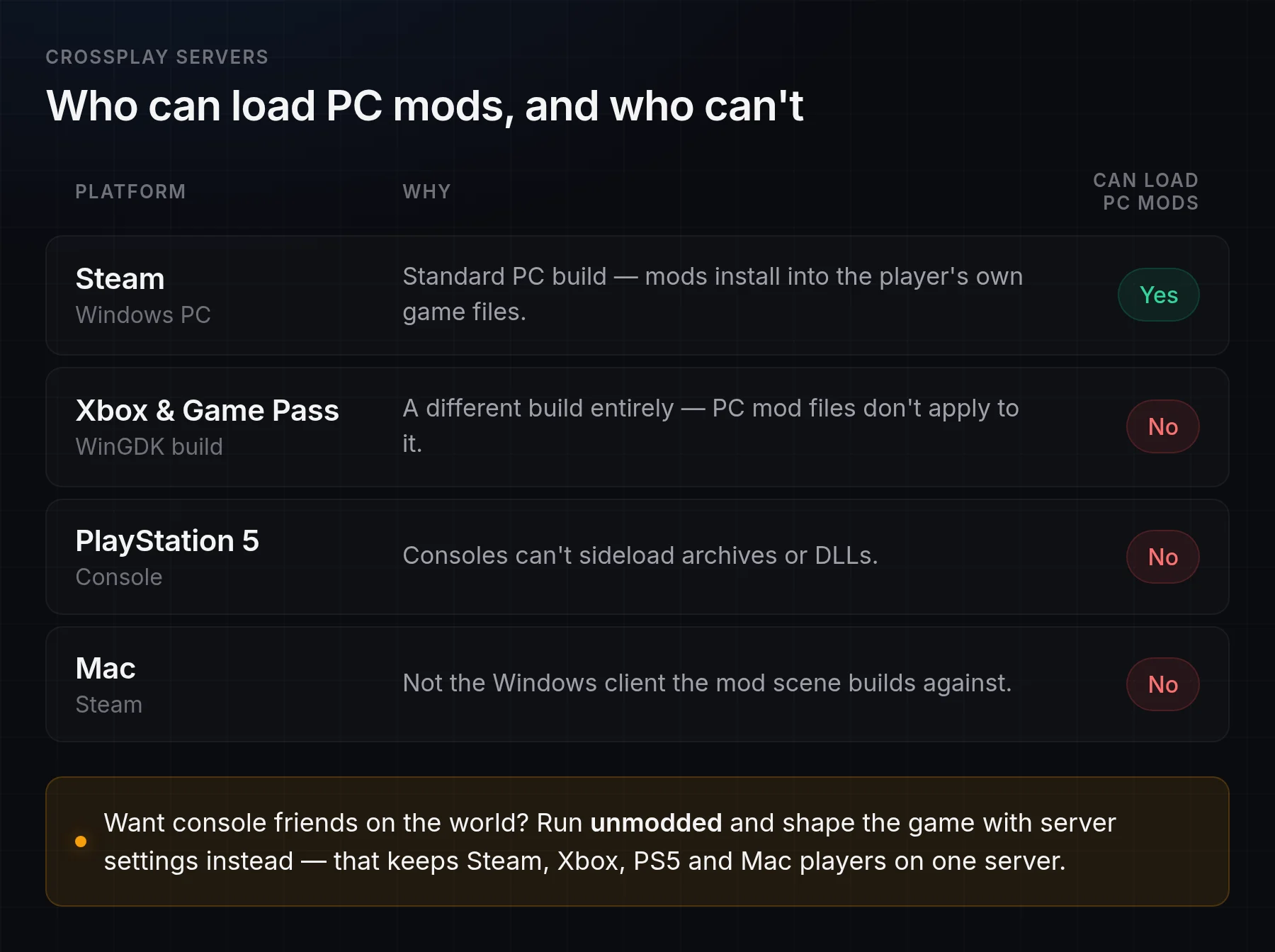
Short answer: no, not for console players. Xbox, Game Pass and PS5 clients cannot load PC mods — Game Pass is a different (WinGDK) build, and consoles can't sideload archives or DLLs. So on a crossplay server:
On a crossplay server, only Windows Steam players can load PC mods at all.
Client mods only affect the PC players who install them; console players are unaffected and can't join a hard-modded PC-only setup.
Server-side mods would need a Windows server anyway — and could shut console clients out entirely.
If crossplay with console friends matters, the clean answer is to run unmodded and shape the game through server settings instead. That keeps Steam, Xbox, PS5 and Mac players all on one world — which is how every server we deploy runs by default.
Do Palworld mods survive game updates?
No — expect them to break on every major update. A big patch changes the underlying engine build, which breaks mod loaders and .pak mods until they're rebuilt to match. 1.0 broke a whole wave of early-access mods exactly this way, and Pocketpair recommends fully deleting mods before updating rather than just switching them off. There's also a hard rule: the server and every client must be on the same game version and the same mods, or players get "connection timed out" errors. Steam auto-updates clients on patch day, so a modded server needs updating (and its mods rechecked) the same day.
What you control on a managed Linux host: version, restarts, settings and specs — from a panel rather than a mod loader.
Our Palworld server hosting keeps servers on the current build with automatic updates and a daily leak-protection restart, and we're straight with customers about what's moddable on Linux rather than promising a workshop that doesn't exist.
Frequently Asked Questions
Are Palworld mods client-side or server-side?
Most are client-only — skins, UI and visual mods change the game only for the player who installs them and do nothing on the server. A mod only affects the server if its Info.json declares "IsServer": trueand the server can load mods, which on Linux hosts it can't. When in doubt, assume a mod is client-side.
Can you install mods on a Palworld dedicated server?
Only on a Windows dedicated server, and even then through the official PalModSettings.ini system or UE4SS. On the Linux binary most performance hosts run, every server-side mod path is Windows-only, so deep mods aren't practical. Tuning via server settings covers what most people want mods for.
What does "Palworld mods are not allowed on this server" mean?
It appears when your client mods don't match the server: the server has modding disabled, or its enabled-mod list doesn't include yours. Remove the client mod and reconnect, or have the mod enabled on the server (Windows only) and matched on every client. Confirm you're both on the same game version too.
Does Palworld have a Steam Workshop?
Yes, as of 1.0 — but it's flagged experimental and is Windows-only, so it doesn't help a Linux dedicated server. Mods also come from Nexus Mods and CurseForge. Pocketpair supports modding but warns it can corrupt saves.
Do Palworld mods work in crossplay with Xbox, Game Pass or PS5?
No. Console and Game Pass players can't load PC mods. Keep a crossplay server unmodded and shape it with server settings so Steam, Xbox, PS5 and Mac players can all join one world.
Do all players need the same mods as the server?
For any mod with a client-side component, yes — everyone needs identical files and the same game version, or they get connection errors. Purely cosmetic client mods only affect the player who installs them.
Why did my mod stop working after an update?
Major Palworld updates change the engine build and break mod loaders and .pak mods until they're updated. 1.0 broke many early-access mods this way. Your server and clients must also all be on the same version with the same mods, or players can't connect — see Palworld server updates and version mismatch for patching a modded server without a boot loop.
Can I mod a managed Palworld server?
You can tune it extensively through settings — rates, difficulty, spawns, PvP, base and Pal limits — which is what most "mods" people want actually do. Deep code mods via UE4SS or the official server system need a Windows server, so they aren't practical on Linux managed hosts today. Any host claiming rich one-click Linux server mods is overselling it.
Want a well-tuned server without the modding rabbit hole? Compare Palworld server hosting plans — full settings control, all 32 slots, kept on the current build.