Instant Deploy
DDoS Protected
9 Global Regions
Connect Hosting logo
BeamMPBlogHelpSupport
Sign inGet Started
Games
BeamMPMinecraftAssetto CorsaPalworldProject ZomboidValheimDragonwildsEnshroudedTerrariaReSkate
BeamMP
Blog
Help
Support
Sign inGet Started
99% Uptime target
Instant Deploy
DDoS Protected
Global Network
Connect Hosting logo

High-performance game server hosting across nine global regions. Enterprise hardware, 480 Gbps DDoS protection, and support that actually answers.

Product

  • Game Servers
  • BeamMP
  • Minecraft
  • Palworld
  • Project Zomboid
  • Valheim
  • Dragonwilds
  • Enshrouded
  • Terraria
  • ReSkate
  • Assetto Corsa
  • London, UK
  • Ashburn, US East
  • Frankfurt, EU

Support

  • Help Center
  • Blog
  • Contact Us
  • Status
  • Switch to Connect

Legal

  • Terms of Service
  • Privacy Policy
  • Cookie Policy

© 2026 Connect Hosting. All rights reserved.

Powered by
Stripe·Pterodactyl·AWS

Xbox Series X|S, Xbox One & PC Game Pass

Palworld Server Hosting
Your Xbox Friends Can Join

A dedicated server your Xbox and Game Pass players find by name in the in-game community list — no IP to type, nothing to port forward, crossplay switched on from the first boot.

from $12.99/mo · all 32 slots
  • Crossplay: PC · Xbox · PS5
  • All 32 slots on every plan
  • DDoS protected
  • Live in under 60 seconds

How Xbox players join

Find It by Name, Not by IP

A Xbox has no address box. Your friends search the in-game community server list for the exact server name and enter the password — so the name and the password are the whole setup.

01

Name the server something searchable

Xbox players find a Palworld server by searching the in-game community server list, so the name is the address. Pick something unusual enough to search for — “Tuesday Pals NW” beats “Palworld Server” — and set it on the Server Settings tab.

02

Set a password

The name is visible to everyone in the community list; the password is what keeps strangers out. Give your group the exact name and the password together.

03

Keep Xbox enabled in Crossplay Platforms

Every server we deploy ships with Steam, Xbox, PS5 and Mac enabled. If the list has been trimmed, open World Settings, find Crossplay Platforms and switch Xbox back on, then restart — Game Pass and Microsoft Store PC players connect through Xbox Live, so they need this toggle too.

04

Search the exact name, join, done

On Xbox: Multiplayer, then the community or dedicated server list, search the exact server name, enter the password. A PC friend can also send an invite. Give a brand-new server a minute or two to appear in the list after its first boot.

Foxparks
NO.005FOXPARKS

Pricing

One Cap: 32 Players. On Every Plan.

Palworld server hosting starts at $12.99/month. Plans differ in memory, storage and backups — never in seats. Pick by world size, not by how many friends you have.

Lamball

Starter

The Lamball tier — humble, dependable, gets it done.

$12.99/mo

billed monthly — cancel anytime

All 32 players included
8GB dedicated RAM
25GB NVMe storage
2 off-server backup slots
Most popular
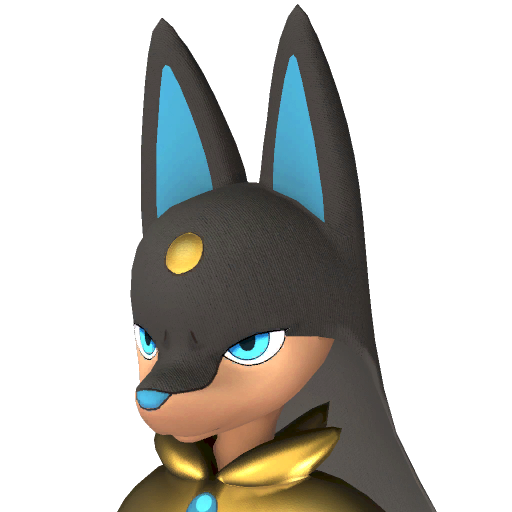
Anubis

Pro

The Anubis tier — the 16GB Pocketpair itself recommends.

$21.99/mo

billed monthly — cancel anytime

All 32 players included
16GB dedicated RAM
40GB NVMe storage
3 off-server backup slots
Jetragon

Beast

The Jetragon tier — endgame speed for packed worlds.

$31.99/mo

billed monthly — cancel anytime

All 32 players included
24GB dedicated RAM
60GB NVMe storage
5 off-server backup slots

Every plan: Palworld 1.0 from day one · auto-updates on restart · DDoS protection · daily leak-protection restarts · instant setup after payment

PayPal & Card accepted · 72-hour money-back guarantee · Cancel anytime

Worth knowing on Xbox

What Is Different About Xbox

Game Pass counts as Xbox, not Steam

The PC Game Pass and Microsoft Store copies of Palworld sign in through Xbox Live. If a server is locked to Steam only, every Game Pass player is silently refused. Leaving Xbox enabled fixes it for console and PC Game Pass alike.

Consoles cannot enter an IP

There is no address box on Xbox. The community server list and invites are the only ways in, which is why the server name and a password matter more than anything else on this page. PC players can still use the direct IP route if they prefer.

The server runs on our PCs, not your console

An Xbox cannot host a dedicated server. What you rent here is a Palworld dedicated server on our hardware, running around the clock, that your Xbox joins. Your world stays up when every console in the group is off.

FAQ

Palworld on Xbox, Answered

Yes. Since the crossplay update, Xbox Series X|S and Xbox One players join dedicated servers through Palworld’s in-game community server list. The server has to have Xbox enabled in Crossplay Platforms, which every server we deploy does by default.
They open Multiplayer, go to the community server list and search the exact server name, then enter the password. Consoles cannot type an IP, so the name is the address. A PC player on the server can also send them an invite.
Yes. PC Game Pass and Microsoft Store players connect through Xbox Live, so they count as Xbox players and join the same way: Xbox enabled in Crossplay Platforms, search the exact name, enter the password.
Four usual causes, in order: Xbox is switched off in Crossplay Platforms; they searched a slightly different name; the server is on a different game version than their console; or the server booted less than a couple of minutes ago and has not been listed yet. Our players-can’t-join guide walks through each.
Steam, Xbox, PS5 and Mac players can all share one dedicated server. Each platform is a toggle in the server’s Crossplay Platforms setting; enable the ones your group uses and restart. Steam plus Xbox plus PS5 covers almost everyone.
Yes. Palworld refuses a join when the client and server builds differ. Patches do not always land on every platform on the same day, so if one platform updated and the others did not, that platform waits until the server and the rest of the group are on the same build.
Yes. Slots are slots — every plan runs the full 32-player server and any mix of Steam, Xbox, PS5 and Mac players can fill them.

Step-by-step help: letting Xbox, PS5 and Game Pass players in and players can’t join my Palworld server.

Playing on another platform?

Palworld server hosting for PS5 →

How PS5 players find and join the same server.

Palworld server hosting →

Every region, plan and platform in one place.

Palworld server hosting in Australia →

Hosted in Sydney for Australian and New Zealand groups.

Grizzbolt
NO.103 GRIZZBOLTELECTRIC

Deploy Your Palworld Server

Updated for 1.0, all 32 friends included, live in under 60 seconds. From $12.99/mo.

72-hour money-back guarantee · Cancel anytime · PayPal & Card accepted

$12.99/mo
Xbox crossplay · 32 players · 60s
Deploy a Palworld server →
4.2 / 5 · Rated Great on Trustpilot from 72 reviews